 Zoltan Papp
fe0e9042ad
Zoltan Papp
fe0e9042ad
* [client] Force interactive login when extending the auth session

A session extend must be answered from the account the peer is registered
under. With a silent PKCE flow (DisablePromptLogin or max_age=0) the IdP
answers from whatever session it already holds, which need not be the
peer's account when several are signed in; the token then fails the
user match in ExtendAuthSession with no way to pick another account.

Mark the PKCE flow request as a session extend so the management server
can force prompt=login for it, overriding the configured silent flow.

* [client] Reduce cognitive complexity of Server.Login

Login sat at cognitive complexity 27, over the 25 the linter allows.

Extract the interactive SSO branch into startSSOLogin, and split the
nested in-flight-flow reuse check out of it into reuseOAuthFlow, which
flattens the original if/else into early returns: it returns the cached
auth info when the previous flow targets the same client and still has
more than 90s left, otherwise cancels the stale wait and returns nil so
the caller requests a fresh flow.

The helpers take the contextState through a small statusSetter
interface, since internal.contextState is unexported and re-deriving it
with CtxGetState inside the helper would resolve against callerCtx
rather than rootCtx.

No behavior change: same ordering of state transitions, same mutex scope
around the oauthAuthFlow write, same error paths. Login is now at 21.

* [client] Respect DisablePromptLogin when extending the auth session

Forcing prompt=login on a session extend overrode DisablePromptLogin, which
is set for IdPs that break on it: Authentik triggers a double authentication
and social logins fail outright. Overriding it there trades a recoverable
extend for a login that cannot complete at all.

Keep the LoginFlag override, which only replaces max_age=0 or none with
prompt=login so the IdP honours login_hint, and leave DisablePromptLogin as
configured. Those deployments keep the silent flow, and with several accounts
signed in an extend answered from the wrong one still fails the user match.

* [client] Guard the shared OAuth flow state with the server mutex

reuseOAuthFlow read flow, expiresAt, waitCancel and info without holding
s.mutex, while startSSOLogin and WaitSSOLogin write them under it. Reading the
fields one at a time could also answer with auth info from a flow that was
already replaced, or cancel a wait that no longer belongs to the flow just
judged stale. Take one snapshot under the lock and decide from it.

WaitSSOLogin read oauthAuthFlow.flow twice outside the lock; both now use a
value snapshotted in the critical section that already installs actCancel.

Its stale waitCancel was read and called in a separate section from the one
installing the new one, so two racing calls could read the same predecessor and
leave one wait uncancelled. Swap the two in a single critical section. Both
cancels run after unlocking: the displaced wait takes s.mutex as it unwinds.

* [client] Verify the SSO login came back for the hinted account

login_hint is a suggestion the IdP may ignore: with a silent flow configured
(DisablePromptLogin or max_age=0) and a live IdP session for another account,
the login completes with that account's token. On a registered peer the
management server rejects it as a user mismatch, but on a fresh profile the
peer silently registers under the wrong account and the profile is then bound
to it — every later login follows the stored hint straight back.

After the token exchange, compare the ID token's email against the hint the
flow was sent with. On a mismatch, do not log in to management with the token;
run one more round asking the IdP to re-decide the account (prompt=login, via
ForceAccountPrompt — DisablePromptLogin still wins there). If the prompted
round also comes back different, proceed with a warning: the address may
legitimately have changed, and refusing forever would lock the user out of the
profile while the management server still rejects a token that does not own
the peer. A token or profile with no email to compare is not judged.

The retry differs per platform because of who opens the browser:

- CLI (netbird login foreground) and Android run the whole flow in one
  process, so the mismatch retries automatically: the browser reopens with
  the account prompt within the same login attempt.
- On desktop the login is split between the daemon and the GUI: Login hands
  the authorize URL to the GUI, WaitSSOLogin blocks for the token, and only
  the GUI can open a browser. A new URL cannot be handed out from inside
  WaitSSOLogin (its response has no field for one, kept that way to avoid a
  proto change), so the daemon arms forceAccountPrompt, fails the round with
  "connect again to choose the account", and builds the next Login's flow
  with the prompt — the user's next connect is the retry.

The flag and the flow annotations live in daemon memory only; SwitchProfile
drops them so the previous profile's hint cannot judge the next profile's
token. The device code flow has no prompt parameter (RFC 8628), so a prompted
round there runs as-is and a repeated mismatch is let through with the
warning rather than looping.

* [client] Address review comments on PKCE session extend flow

Fail the PKCE authorization flow test on request error instead of
continuing into a nil dereference, and make the godoc comments on the
touched exported symbols identifier-leading full sentences.

* [client] Match accounts only on the email claim of the ID token

The name-claim fallback in the ID token parsing is kept for the login
hint and display, but account matching now only considers a value that
came from the email claim, so a token without one no longer produces a
false account mismatch.

* [client] Drop the pending session extend on a profile switch

The profile-switch cleanup dropped the pending login flow and the
account-prompt flag, but left extendAuthSessionFlow untouched. Its device
code was issued by the previous profile's IdP client, so a
WaitExtendAuthSession still parked on the browser leg would submit the
resulting token against the new profile's engine.

* [client] Judge the SSO account against the flow that produced the token

WaitSSOLogin snapshotted the flow on entry but re-read the info, hint and
accountPrompted from the live s.oauthAuthFlow afterwards, in separate
critical sections. WaitToken blocks for the whole browser leg, so a
concurrent Login or RequestJWTAuth could replace the flow meanwhile and
the mismatch check would compare this wait's token against another flow's
account: either arming the prompt spuriously or letting a wrong-account
token through against an unrelated profile's hint. Take all of it in the
entry snapshot.

* [client] Keep the forced account prompt from being lost to flow reuse

startSSOLogin consumed forceAccountPrompt and applied the prompt to the
freshly built flow, but reuseOAuthFlow could then answer from a cached
flow for the same client — one built without prompt=login, e.g. by
RequestJWTAuth. The user got the same silent authorization URL that
produced the mismatch, with the flag already spent, so no later round
asked either. Rule reuse out when the prompt is forced, while still
cancelling the predecessor's wait.

RequestJWTAuth also wrote the flow fields one by one, leaving the previous
login's hint and accountPrompted behind for WaitSSOLogin to judge a later
token against. Both sites now replace the whole record.

* [client] Consume the forced account prompt after the retry

forceAccountPrompt was never cleared, so a flow that outlived the retry it
was armed for kept sending prompt=login on every later authorization
request and re-authenticated the user each time. RequestAuthInfo now takes
the flag as it builds the request.

* [client] Cancel the caller context in the SSO login tests

WaitSSOLogin parks a goroutine on the caller's context for the whole
browser leg. The tests passed context.Background(), which never cancels,
so each left one goroutine behind for the lifetime of the test binary.

* [client] Cancel the wait displaced by an OAuth flow replacement

Replacing the shared record with a whole struct value dropped the previous
flow's waitCancel, so an SSO browser wait still parked on it lost its
cancel: nothing could preempt it, and it could go on to run attemptLogin
or mutate the record behind the new flow. Both replacement sites now take
the displaced cancel over in the same critical section, via a shared
replaceOAuthFlow, and invoke it after the unlock.

* [client] Guard OAuth flow mutations by the flow that owns the wait

* [client] Arm the account prompt only from the wait that owns the flow

* [client] Drop the pending login flow when a login switches the profile

SwitchProfile cancels the pending OAuth wait and clears the flow record,
the account-prompt flag and the pending session extend, because they
describe the previous profile's login. A Login or Up that carries a
ProfileName switches the profile through switchProfileIfNeeded without
that cleanup, so reuseOAuthFlow could hand the new profile the previous
profile's flow: the same IdP client ID, the previous account's
login_hint in the URL, and a record whose hint WaitSSOLogin would judge
the new profile's token against. That either fails the login with a
spurious account mismatch or lets a fresh peer register under the other
account.

switchProfileIfNeeded now reports whether it switched, and its callers
run the same cleanup on a switch. A login on the same profile keeps the
pending flow, so a second client can still join it.

* [client] Clear the JWT cache when a login switches the profile

The daemon keeps the user's JWT in a cache for SSH logins. When the user
switches to another profile, this token belongs to the old profile, so it
must not be used for the new one.

SwitchProfile already cleared the cache. A login or up request can also
switch the profile, but it did not clear the cache. After such a switch,
SSH could still use the old profile's token, and a sign-in still running
for the old profile could save its token into the new profile's cache.

Clear the cache in dropPendingAuthFlows, so every profile switch does it.

* [client] Bump the JWT cache generation with the config swap in Login

RequestJWTAuth snapshots s.config and the cache generation under one
s.mutex section and relies on the two flipping together. Login cleared
the cache right after the profile switch but replaced s.config only
later, after getConfig, so a JWT flow started in between carried the
previous profile's config with the new generation, and its token landed
in the cache the new profile then served.

The swap now bumps the generation under the same lock. The early drop
stays: it covers a login that fails after the switch, where a retry no
longer sees a profile change.





Start using NetBird at netbird.io
See Documentation
Join our Slack channel or our Community forum
🚀 We are hiring! Join us at https://netbird.io/careers
🤖 NetBird Agent Network (Beta)
Identity-aware access control for AI agents — keyless access to LLM APIs and private resources over the encrypted NetBird tunnel. See
agent-network/or read the docs at netbird.ai.
NetBird combines a configuration-free peer-to-peer private network and a centralized access control system in a single platform, making it easy to create secure private networks for your organization or home.
Connect. NetBird creates a WireGuard-based overlay network that automatically connects your machines over an encrypted tunnel, leaving behind the hassle of opening ports, complex firewall rules, VPN gateways, and so forth.
Secure. NetBird enables secure remote access by applying granular access policies while allowing you to manage them intuitively from a single place. Works universally on any infrastructure.
https://github.com/user-attachments/assets/10cec749-bb56-4ab3-97af-4e38850108d2
Self-host NetBird (video)

Key features
Quickstart with NetBird Cloud
- Download and install NetBird at https://app.netbird.io/install.
- Follow the steps to sign up with Google, Microsoft, GitHub or your email address.
- Check the NetBird admin UI.
Quickstart with self-hosted NetBird
This is the quickest way to try self-hosted NetBird. It should take around 5 minutes to get started if you already have a public domain and a VM. Follow the Advanced guide with a custom identity provider for installations with different IdPs.
Infrastructure requirements:
- A Linux VM with at least 1 CPU and 2 GB of memory.
- The VM should be publicly accessible on TCP ports 80 and 443 and UDP port 3478.
- A public domain name pointing to the VM.
Software requirements:
- Docker with the Compose plugin (Compose v2 or higher). See the Docker installation guide.
Steps
- Download and run the installation script:
export NETBIRD_DOMAIN=netbird.example.com; curl -fsSL https://github.com/netbirdio/netbird/releases/latest/download/getting-started.sh | bash
A bit on NetBird internals
- Every machine in the network runs the NetBird agent, which manages WireGuard.
- Every agent connects to the Management Service, which holds network state, manages peer IPs, and distributes updates to agents.
- Agents use ICE (via pion/ice) to discover connection candidates for peer-to-peer connections.
- Candidates are discovered with the help of STUN servers.
- Agents negotiate a connection through the Signal Service, exchanging end-to-end encrypted messages with candidates.
- When NAT traversal fails (e.g. mobile carrier-grade NAT) and a direct p2p connection isn't possible, the system falls back to a Relay Service and a secure WireGuard tunnel is established through it.
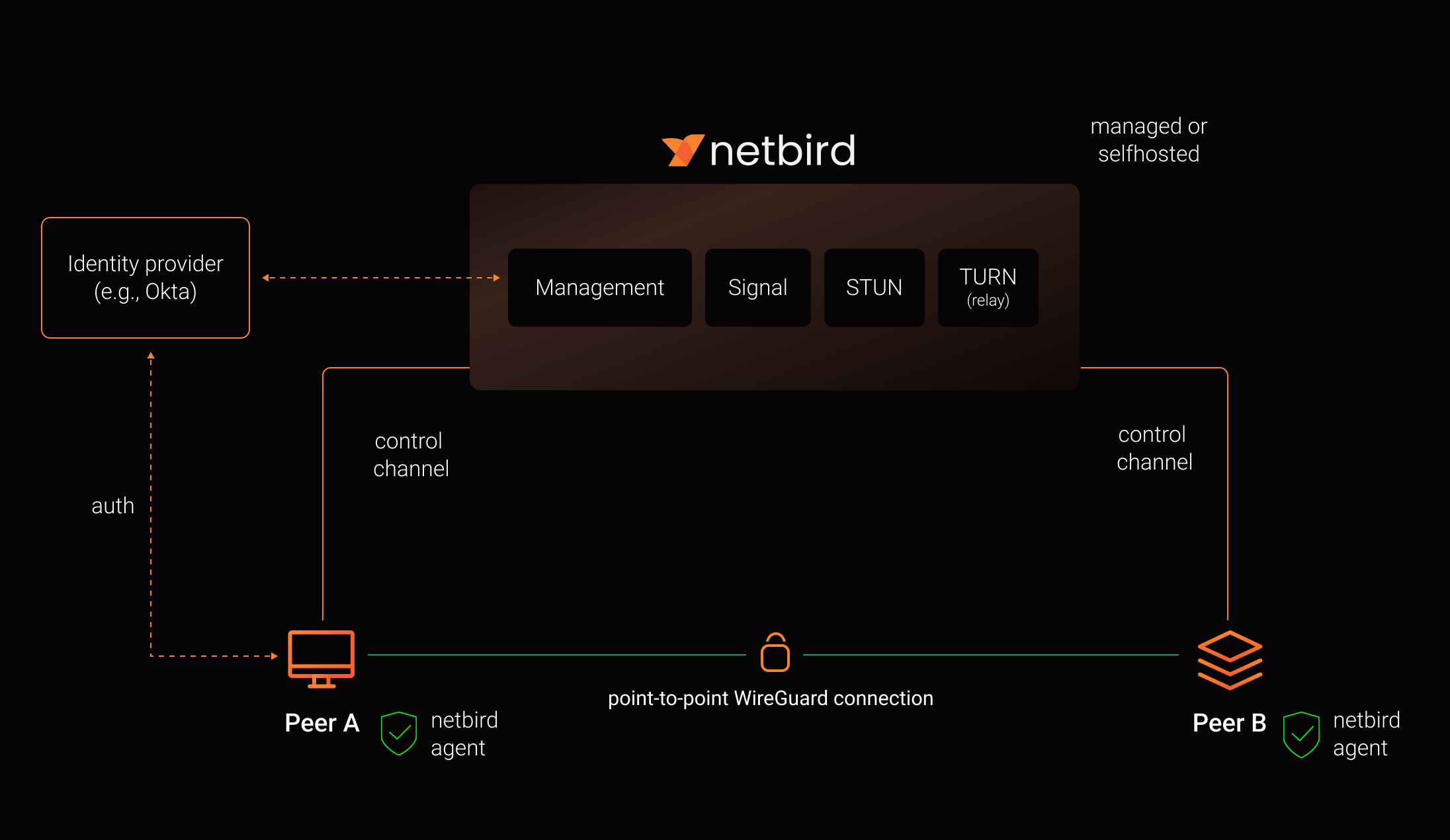
See a complete architecture overview for details.
Reporting bugs and requesting features
NetBird uses a discussion-first workflow. Bug reports and feature requests start in Discussions, not as issues.
| What you want to do | Where to go |
|---|---|
| Report a bug, regression, or unexpected behavior | Issue Triage |
| Request a feature or share an idea | Ideas & Feature Requests |
| Ask about setup, configuration, or self-hosting | Q&A / Support |
| Report a security vulnerability | Security policy, never a public thread |
Our team and maintainers triage discussions, ask follow-up questions, check for duplicates, and reproduce bugs. Validated reports are promoted to issues. This keeps the issue tracker a clear answer to one question: what is the team working on.
Please search existing discussions and issues first, including closed ones. If something similar already exists, upvote it and add your details there instead of opening a duplicate.
For bug reports, include your NetBird version, operating system, deployment type (Cloud, self-hosted, Kubernetes, or Docker), reproduction steps, expected and actual behavior, and a debug bundle where relevant:
netbird version
netbird status -d -A
netbird debug for 1m -A -S -U
-U uploads the bundle and prints a file key you can paste instead of attaching the archive.
-A anonymizes the output, which matters on a public thread. It masks most identifying details
but is not full redaction, so read the bundle before posting it. Two levels are available:
| Level | How to select | What it masks |
|---|---|---|
default |
-A / --anonymize |
Public IP addresses, IPv6 ULA addresses, MAC addresses, and domains other than netbird.io, netbird.cloud, netbird.selfhosted, and netbird.stage. IPv4 private, CGNAT, and link-local ranges are kept |
strict |
--anonymize-level strict (implies -A) |
The above, plus IPv4 private, CGNAT, and link-local ranges, peer names in front of netbird.cloud, netbird.selfhosted, and netbird.stage, and WireGuard public keys. Labels under netbird.io are kept, since it only hosts infrastructure |
See collecting a debug bundle and the CLI reference for details.
See How to use Discussions, Issues, and Pull Requests for the full workflow, or SUPPORT.md for a shorter version.
Contributing
Contributions are welcome. Read CONTRIBUTING.md first. NetBird works ticket first, anything that changes behavior needs an issue the team has agreed on before you open a pull request.
Community projects
- NetBird installer script
- netbird-tui - terminal UI for managing NetBird peers, routes, and settings
- caddy-netbird - Caddy plugin that embeds a NetBird client for proxying HTTP and TCP/UDP traffic through NetBird networks
Note: The main branch may be in an unstable or even broken state during development.
For stable versions, see releases.
Support acknowledgement
In November 2022, NetBird joined the StartUpSecure program sponsored by the Federal Ministry of Education and Research of the Federal Republic of Germany. Together with the CISPA Helmholtz Center for Information Security, NetBird brings security best practices and simplicity to private networking.

Acknowledgements
We build on open source technologies like WireGuard®, Pion ICE, and Rosenpass. We greatly appreciate the work these projects are doing, and we'd love it if you could support them too (e.g., by starring or contributing).
Legal
This repository is licensed under the BSD-3-Clause license, which applies to all parts of the repository except for the directories management/, signal/ and relay/. Those directories are licensed under the GNU Affero General Public License version 3.0 (AGPLv3). See the respective LICENSE files inside each directory.
WireGuard and the WireGuard logo are registered trademarks of Jason A. Donenfeld.