 Zoltan Papp
f6900fb07c
Zoltan Papp
f6900fb07c
* routemanager: enforce a single selected exit node

Backport of the exit-node exclusivity reconcile from the 0.75.0 line
(upstream commit 966fbec11) onto v0.74.0. Exit nodes are mutually
exclusive, but the RouteSelector stores routes with default-on semantics,
so every available exit node reported as selected at once.

Reconcile exit-node selection on each network map: keep at most one
selected -- the user's persisted pick, else whatever management marks for
auto-apply (SkipAutoApply=false), else none. Never auto-activate an exit
node the map does not request.

Carries over only the manager/routeselector logic and its test; the
desktop-only client/server changes and the BumpNetworksRevision UI-push
feature from the original commit are intentionally excluded.

* routeselector: make exit-node reconciliation atomic

enforceSingleExitNode took the RouteSelector lock three separate times
(IsDeselectAll, then DeselectRoutes, then SelectRoutes), so a concurrent
DeselectAllRoutes could interleave and be silently undone: SelectRoutes on
its deselectAll branch clears the flag and re-selects the preferred exit
node, overriding the user's "all off".

Move the whole reconciliation into a single locked RouteSelector method
(SetExclusiveExitNode) that checks deselectAll inside the critical section,
so a deselect-all either fully precedes the reconcile (left untouched) or
fully follows it (honoured). No interleaving is possible.





Start using NetBird at netbird.io
See Documentation
Join our Slack channel or our Community forum
🚀 We are hiring! Join us at https://netbird.io/careers
🤖 NetBird Agent Network (Beta)
Identity-aware access control for AI agents — keyless access to LLM APIs and private resources over the encrypted NetBird tunnel. See
agent-network/or read the docs at netbird.ai.
NetBird combines a configuration-free peer-to-peer private network and a centralized access control system in a single platform, making it easy to create secure private networks for your organization or home.
Connect. NetBird creates a WireGuard-based overlay network that automatically connects your machines over an encrypted tunnel, leaving behind the hassle of opening ports, complex firewall rules, VPN gateways, and so forth.
Secure. NetBird enables secure remote access by applying granular access policies while allowing you to manage them intuitively from a single place. Works universally on any infrastructure.
https://github.com/user-attachments/assets/10cec749-bb56-4ab3-97af-4e38850108d2
Self-host NetBird (video)

Key features
Quickstart with NetBird Cloud
- Download and install NetBird at https://app.netbird.io/install.
- Follow the steps to sign up with Google, Microsoft, GitHub or your email address.
- Check the NetBird admin UI.
Quickstart with self-hosted NetBird
This is the quickest way to try self-hosted NetBird. It should take around 5 minutes to get started if you already have a public domain and a VM. Follow the Advanced guide with a custom identity provider for installations with different IdPs.
Infrastructure requirements:
- A Linux VM with at least 1 CPU and 2 GB of memory.
- The VM should be publicly accessible on TCP ports 80 and 443 and UDP port 3478.
- A public domain name pointing to the VM.
Software requirements:
- Docker with the Compose plugin (Compose v2 or higher). See the Docker installation guide.
Steps
- Download and run the installation script:
export NETBIRD_DOMAIN=netbird.example.com; curl -fsSL https://github.com/netbirdio/netbird/releases/latest/download/getting-started.sh | bash
A bit on NetBird internals
- Every machine in the network runs the NetBird agent, which manages WireGuard.
- Every agent connects to the Management Service, which holds network state, manages peer IPs, and distributes updates to agents.
- Agents use ICE (via pion/ice) to discover connection candidates for peer-to-peer connections.
- Candidates are discovered with the help of STUN servers.
- Agents negotiate a connection through the Signal Service, exchanging end-to-end encrypted messages with candidates.
- When NAT traversal fails (e.g. mobile carrier-grade NAT) and a direct p2p connection isn't possible, the system falls back to a Relay Service and a secure WireGuard tunnel is established through it.
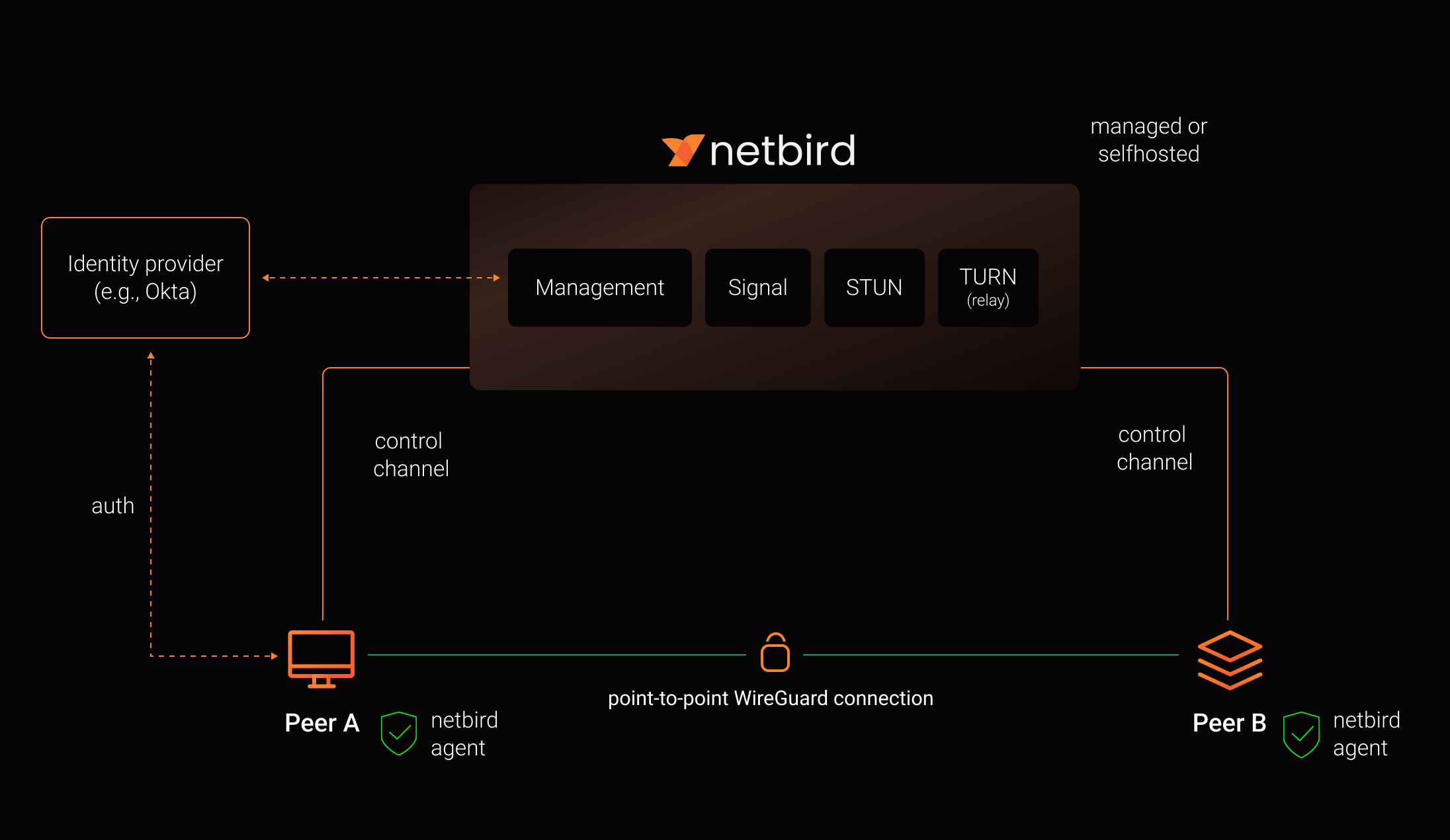
See a complete architecture overview for details.
Community projects
- NetBird installer script
- netbird-tui - terminal UI for managing NetBird peers, routes, and settings
- caddy-netbird - Caddy plugin that embeds a NetBird client for proxying HTTP and TCP/UDP traffic through NetBird networks
Note: The main branch may be in an unstable or even broken state during development.
For stable versions, see releases.
Support acknowledgement
In November 2022, NetBird joined the StartUpSecure program sponsored by the Federal Ministry of Education and Research of the Federal Republic of Germany. Together with the CISPA Helmholtz Center for Information Security, NetBird brings security best practices and simplicity to private networking.

Acknowledgements
We build on open-source technologies like WireGuard®, Pion ICE, and Rosenpass. We greatly appreciate the work these projects are doing, and we'd love it if you could support them too (e.g., by starring or contributing).
Legal
This repository is licensed under the BSD-3-Clause license, which applies to all parts of the repository except for the directories management/, signal/ and relay/. Those directories are licensed under the GNU Affero General Public License version 3.0 (AGPLv3). See the respective LICENSE files inside each directory.
WireGuard and the WireGuard logo are registered trademarks of Jason A. Donenfeld.