 Zoltan Papp
e392c5899e
Zoltan Papp
e392c5899e
* [relay] Bind listeners before serving to fix the shutdown race

A shutdown signal that arrives while the relay is still starting races
the listener goroutines. Server.Shutdown read the listener's server
field while Listen was writing it, which the race detector reported,
and when Shutdown won it saw a nil server, returned as if nothing was
running, and the listener then bound and served with nothing left to
stop it. Server.Listen never returned and the process hung on exit.

The listener lifecycle is now split into Bind and Serve. Server.Listen
binds every listener under its mutex before spawning the accept loops,
so the fields Shutdown reads are written before the goroutines exist.
A closed flag on the server makes a Listen that runs after Shutdown
return without binding. A bind failure on one listener shuts down the
ones already bound and surfaces the error at once instead of holding
it in a channel until the surviving listener exits.

* [relay] Mark the server closed before shutting down the relay

Shutdown set the closed flag only after the relay had finished closing
peers, so a Listen that started during that window could bind sockets
and start serving on a server that was already going down. The flag is
now set under listenerMux before the relay shutdown, and Accept closes
connections it receives once the relay is closed instead of leaving
them to the client's timeout.

The tests now cover the public Listen bind failure and a QUIC listener
shut down while blocked in Accept, and they pick ports that are free
for both TCP and UDP, reporting a bind error instead of a timeout.

* Fix tests

* [relay] Test the Listen and Shutdown race and the QUIC bind rollback

The existing tests order Listen and Shutdown deterministically, so the
race the fix targets was never exercised. A new test fires both from a
shared start channel across repeated rounds so either side can take the
lock first, and fails on the hang the old code produced.

The rollback test now drives Server.Listen with the real ws and quic
listeners and a UDP blocker, so the ws socket is bound and released when
the quic bind fails. Both tests pass a real TLS config because a nil one
only yields a quic listener in the devcert build.

* [relay] Bound the Shutdown wait in the concurrent Listen and Shutdown test

* [relay] Keep the default WS port for an empty listen address

net.Listen picks a random port for an empty address, while ListenAndServe
used :http or :https. Apply the same default in Bind so an empty address
keeps listening where it did before.

* [relay] Release the WS socket when Serve fails

ServeTLS can return before it takes ownership of the listener, for example
when no certificate is configured, leaving the socket opened in Bind bound
until Shutdown. Close it in Serve on any error other than a server close.

* [relay] Drain the relay outside the listener lock

Shutdown held listenerMux while the relay closed its peers gracefully, so
ListenerProtocols, and with it the healthcheck, blocked for the whole drain.
Mark the server closed and take the listeners under the lock, then drain and
stop them after releasing it. The closed flag still keeps Listen from
registering new listeners.





Start using NetBird at netbird.io
See Documentation
Join our Slack channel or our Community forum
🚀 We are hiring! Join us at https://netbird.io/careers
🤖 NetBird Agent Network (Beta)
Identity-aware access control for AI agents — keyless access to LLM APIs and private resources over the encrypted NetBird tunnel. See
agent-network/or read the docs at netbird.ai.
NetBird combines a configuration-free peer-to-peer private network and a centralized access control system in a single platform, making it easy to create secure private networks for your organization or home.
Connect. NetBird creates a WireGuard-based overlay network that automatically connects your machines over an encrypted tunnel, leaving behind the hassle of opening ports, complex firewall rules, VPN gateways, and so forth.
Secure. NetBird enables secure remote access by applying granular access policies while allowing you to manage them intuitively from a single place. Works universally on any infrastructure.
https://github.com/user-attachments/assets/10cec749-bb56-4ab3-97af-4e38850108d2
Self-host NetBird (video)

Key features
Quickstart with NetBird Cloud
- Download and install NetBird at https://app.netbird.io/install.
- Follow the steps to sign up with Google, Microsoft, GitHub or your email address.
- Check the NetBird admin UI.
Quickstart with self-hosted NetBird
This is the quickest way to try self-hosted NetBird. It should take around 5 minutes to get started if you already have a public domain and a VM. Follow the Advanced guide with a custom identity provider for installations with different IdPs.
Infrastructure requirements:
- A Linux VM with at least 1 CPU and 2 GB of memory.
- The VM should be publicly accessible on TCP ports 80 and 443 and UDP port 3478.
- A public domain name pointing to the VM.
Software requirements:
- Docker with the Compose plugin (Compose v2 or higher). See the Docker installation guide.
Steps
- Download and run the installation script:
export NETBIRD_DOMAIN=netbird.example.com; curl -fsSL https://github.com/netbirdio/netbird/releases/latest/download/getting-started.sh | bash
A bit on NetBird internals
- Every machine in the network runs the NetBird agent, which manages WireGuard.
- Every agent connects to the Management Service, which holds network state, manages peer IPs, and distributes updates to agents.
- Agents use ICE (via pion/ice) to discover connection candidates for peer-to-peer connections.
- Candidates are discovered with the help of STUN servers.
- Agents negotiate a connection through the Signal Service, exchanging end-to-end encrypted messages with candidates.
- When NAT traversal fails (e.g. mobile carrier-grade NAT) and a direct p2p connection isn't possible, the system falls back to a Relay Service and a secure WireGuard tunnel is established through it.
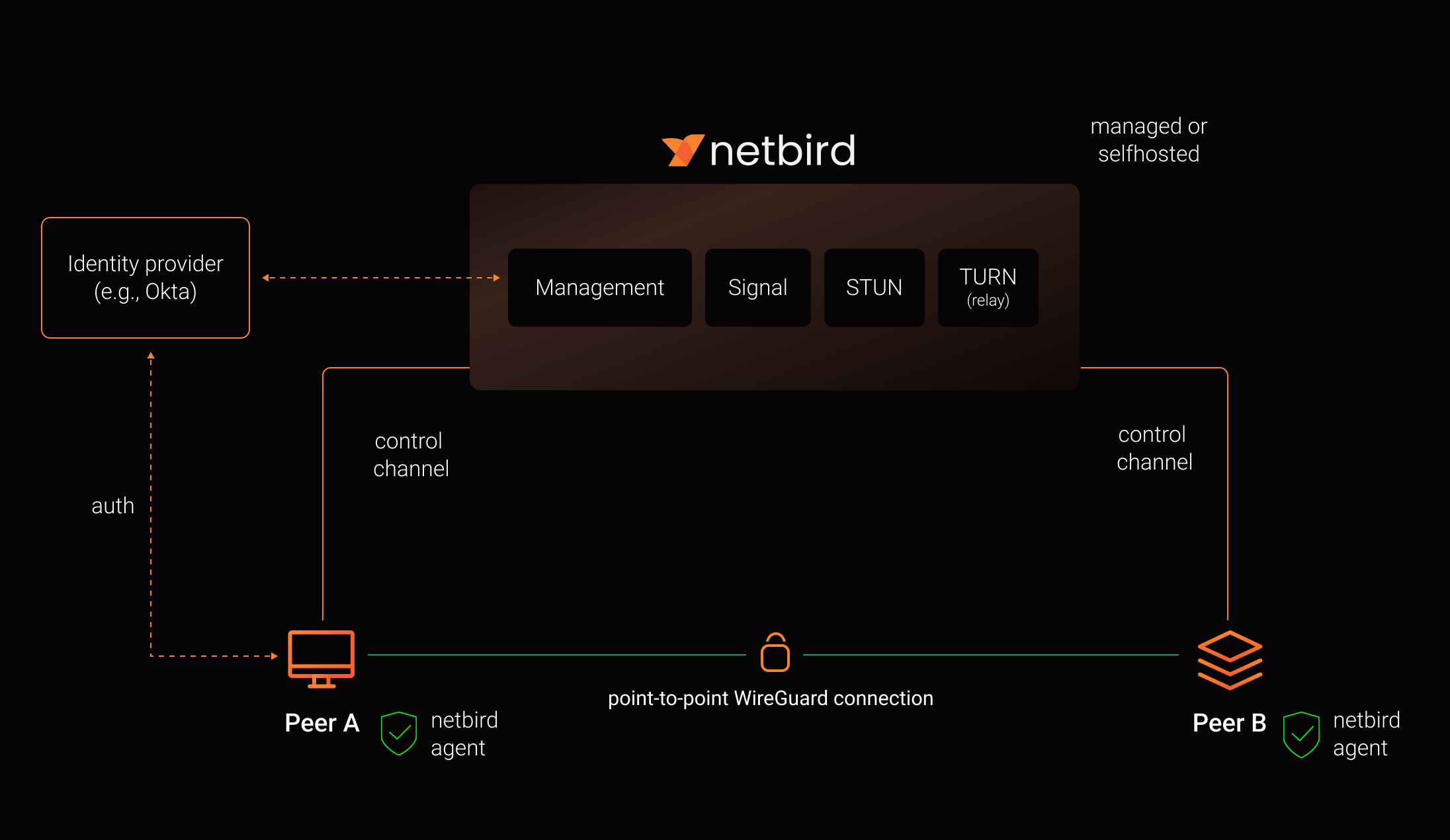
See a complete architecture overview for details.
Reporting bugs and requesting features
NetBird uses a discussion-first workflow. Bug reports and feature requests start in Discussions, not as issues.
| What you want to do | Where to go |
|---|---|
| Report a bug, regression, or unexpected behavior | Issue Triage |
| Request a feature or share an idea | Ideas & Feature Requests |
| Ask about setup, configuration, or self-hosting | Q&A / Support |
| Report a security vulnerability | Security policy, never a public thread |
Our team and maintainers triage discussions, ask follow-up questions, check for duplicates, and reproduce bugs. Validated reports are promoted to issues. This keeps the issue tracker a clear answer to one question: what is the team working on.
Please search existing discussions and issues first, including closed ones. If something similar already exists, upvote it and add your details there instead of opening a duplicate.
For bug reports, include your NetBird version, operating system, deployment type (Cloud, self-hosted, Kubernetes, or Docker), reproduction steps, expected and actual behavior, and a debug bundle where relevant:
netbird version
netbird status -d -A
netbird debug for 1m -A -S -U
-U uploads the bundle and prints a file key you can paste instead of attaching the archive.
-A anonymizes the output, which matters on a public thread. It masks most identifying details
but is not full redaction, so read the bundle before posting it. Two levels are available:
| Level | How to select | What it masks |
|---|---|---|
default |
-A / --anonymize |
Public IP addresses, IPv6 ULA addresses, MAC addresses, and domains other than netbird.io, netbird.cloud, netbird.selfhosted, and netbird.stage. IPv4 private, CGNAT, and link-local ranges are kept |
strict |
--anonymize-level strict (implies -A) |
The above, plus IPv4 private, CGNAT, and link-local ranges, peer names in front of netbird.cloud, netbird.selfhosted, and netbird.stage, and WireGuard public keys. Labels under netbird.io are kept, since it only hosts infrastructure |
See collecting a debug bundle and the CLI reference for details.
See How to use Discussions, Issues, and Pull Requests for the full workflow, or SUPPORT.md for a shorter version.
Contributing
Contributions are welcome. Read CONTRIBUTING.md first. NetBird works ticket first, anything that changes behavior needs an issue the team has agreed on before you open a pull request.
Community projects
- NetBird installer script
- netbird-tui - terminal UI for managing NetBird peers, routes, and settings
- caddy-netbird - Caddy plugin that embeds a NetBird client for proxying HTTP and TCP/UDP traffic through NetBird networks
Note: The main branch may be in an unstable or even broken state during development.
For stable versions, see releases.
Support acknowledgement
In November 2022, NetBird joined the StartUpSecure program sponsored by the Federal Ministry of Education and Research of the Federal Republic of Germany. Together with the CISPA Helmholtz Center for Information Security, NetBird brings security best practices and simplicity to private networking.

Acknowledgements
We build on open source technologies like WireGuard®, Pion ICE, and Rosenpass. We greatly appreciate the work these projects are doing, and we'd love it if you could support them too (e.g., by starring or contributing).
Legal
This repository is licensed under the BSD-3-Clause license, which applies to all parts of the repository except for the directories management/, signal/ and relay/. Those directories are licensed under the GNU Affero General Public License version 3.0 (AGPLv3). See the respective LICENSE files inside each directory.
WireGuard and the WireGuard logo are registered trademarks of Jason A. Donenfeld.