 Riccardo Manfrin
c7f610e6cd
Riccardo Manfrin
c7f610e6cd
Nothing in CI compiles the files behind //go:build android or //go:build ios.
The android bridge builds 7 of its 23 files on linux and skips client.go; the
iOS SDK is not built at all. The linter matrix picks a GOOS by picking a runner
OS, so it loads the same file set as the host build and never sees them either.
A type error in client/android/client.go therefore passes every check on its
PR, merges, and is discovered by netbirdio/android-client after sync-tag.yml
fires trigger_android_bump on the release tag.

The new Mobile workflow cross-compiles ./client/android/... for the GOARCH
values gomobile ships and ./client/ios/..., and vets the android bridge. The
new Android and iOS lint jobs run golangci-lint with GOOS/GOARCH in the job
env. No NDK, Xcode or gomobile is needed: these are library packages, so the
compiler type-checks them without a link step, and the dependency graph drags
in the android/ios-tagged files across client/iface, client/internal/dns and
client/internal/routemanager with them.

Linting those files for the first time surfaces one gosec G101 on the SSH
password-required marker. It is a sentinel string the Java side matches on,
not a credential, so it is suppressed at the declaration.





Start using NetBird at netbird.io
See Documentation
Join our Slack channel or our Community forum
🚀 We are hiring! Join us at https://netbird.io/careers
🤖 NetBird Agent Network (Beta)
Identity-aware access control for AI agents — keyless access to LLM APIs and private resources over the encrypted NetBird tunnel. See
agent-network/or read the docs at netbird.ai.
NetBird combines a configuration-free peer-to-peer private network and a centralized access control system in a single platform, making it easy to create secure private networks for your organization or home.
Connect. NetBird creates a WireGuard-based overlay network that automatically connects your machines over an encrypted tunnel, leaving behind the hassle of opening ports, complex firewall rules, VPN gateways, and so forth.
Secure. NetBird enables secure remote access by applying granular access policies while allowing you to manage them intuitively from a single place. Works universally on any infrastructure.
https://github.com/user-attachments/assets/10cec749-bb56-4ab3-97af-4e38850108d2
Self-host NetBird (video)

Key features
Quickstart with NetBird Cloud
- Download and install NetBird at https://app.netbird.io/install.
- Follow the steps to sign up with Google, Microsoft, GitHub or your email address.
- Check the NetBird admin UI.
Quickstart with self-hosted NetBird
This is the quickest way to try self-hosted NetBird. It should take around 5 minutes to get started if you already have a public domain and a VM. Follow the Advanced guide with a custom identity provider for installations with different IdPs.
Infrastructure requirements:
- A Linux VM with at least 1 CPU and 2 GB of memory.
- The VM should be publicly accessible on TCP ports 80 and 443 and UDP port 3478.
- A public domain name pointing to the VM.
Software requirements:
- Docker with the Compose plugin (Compose v2 or higher). See the Docker installation guide.
Steps
- Download and run the installation script:
export NETBIRD_DOMAIN=netbird.example.com; curl -fsSL https://github.com/netbirdio/netbird/releases/latest/download/getting-started.sh | bash
A bit on NetBird internals
- Every machine in the network runs the NetBird agent, which manages WireGuard.
- Every agent connects to the Management Service, which holds network state, manages peer IPs, and distributes updates to agents.
- Agents use ICE (via pion/ice) to discover connection candidates for peer-to-peer connections.
- Candidates are discovered with the help of STUN servers.
- Agents negotiate a connection through the Signal Service, exchanging end-to-end encrypted messages with candidates.
- When NAT traversal fails (e.g. mobile carrier-grade NAT) and a direct p2p connection isn't possible, the system falls back to a Relay Service and a secure WireGuard tunnel is established through it.
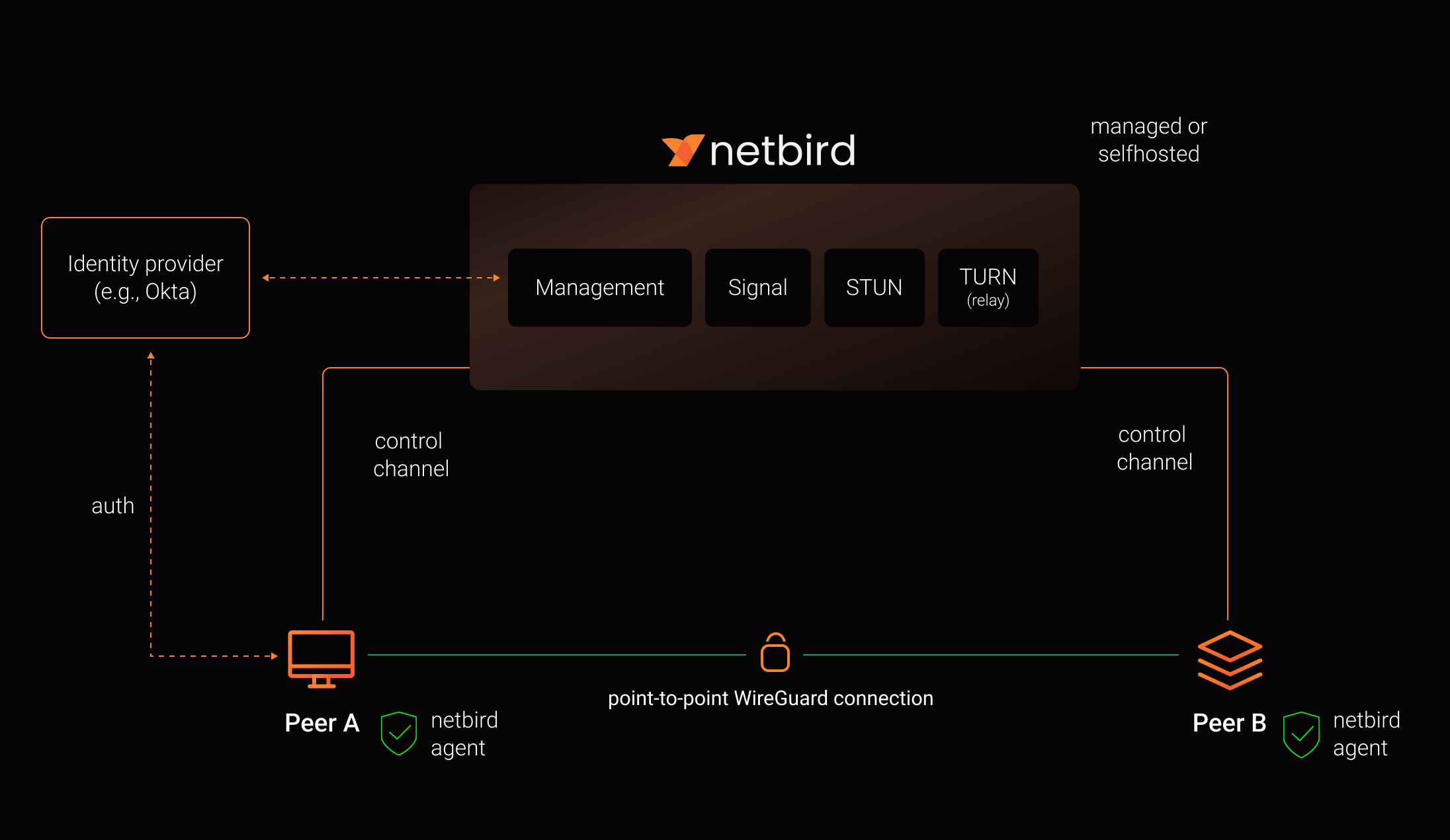
See a complete architecture overview for details.
Community projects
- NetBird installer script
- netbird-tui - terminal UI for managing NetBird peers, routes, and settings
- caddy-netbird - Caddy plugin that embeds a NetBird client for proxying HTTP and TCP/UDP traffic through NetBird networks
Note: The main branch may be in an unstable or even broken state during development.
For stable versions, see releases.
Support acknowledgement
In November 2022, NetBird joined the StartUpSecure program sponsored by the Federal Ministry of Education and Research of the Federal Republic of Germany. Together with the CISPA Helmholtz Center for Information Security, NetBird brings security best practices and simplicity to private networking.

Acknowledgements
We build on open source technologies like WireGuard®, Pion ICE, and Rosenpass. We greatly appreciate the work these projects are doing, and we'd love it if you could support them too (e.g., by starring or contributing).
Legal
This repository is licensed under the BSD-3-Clause license, which applies to all parts of the repository except for the directories management/, signal/ and relay/. Those directories are licensed under the GNU Affero General Public License version 3.0 (AGPLv3). See the respective LICENSE files inside each directory.
WireGuard and the WireGuard logo are registered trademarks of Jason A. Donenfeld.