 Zoltan PappandClaude Opus 5
bc44cdc37a
Zoltan PappandClaude Opus 5
bc44cdc37a
* [client] Show the SSO login popup and open the browser from Go

The browser-login popup was created hidden and relied on its own webview
to size and show itself and to launch the external browser. On macOS a
hidden WKWebView gets throttled or suspended (App Nap / hidden-window
throttling), so on the first-use path nothing appeared and the browser
never opened, leaving the session-expiration dialog disabled until the
PKCE flow timed out. Reproduced by freezing the popup's WebContent
process: the old code showed nothing, the new code shows the popup and
opens the browser within 30 ms regardless of the webview state.

Show and focus the popup from Go right after creation and launch the
browser from Go on both the create and reuse paths. The popup's frontend
no longer shows or focuses itself, so the browser keeps the foreground
once it activates. This also fixes the reuse path, where a fragment-only
SetURL kept the mounted React tree and the once-only guard skipped
opening the browser for the new URI. Browser launch failures surface in
the error dialog instead of being swallowed.

* [client] Show every dialog window from Go once its frontend has painted

Dialog windows (browser-login, session-expiration, install-progress,
welcome, error) were created hidden and made visible only by their own
webview's Show call after sizing. A hidden WKWebView on macOS can be
throttled or suspended before that code runs, which left the window
hidden forever. The main and settings windows already avoided this with
the painted event plus a fallback timer, but that timer was armed on
WindowRuntimeReady, which a frozen webview never reaches either.

Route all dialogs through the same mechanism: the auto-size hook emits
the painted event instead of showing the window, Go shows and focuses
it on that event, and a fallback timer armed at creation shows it after
3 s regardless. The browser-login popup opens the browser in an
after-show callback so the browser still lands in front of the popup,
also on the fallback path.

* [client] Tie install-progress hidden-window restore to the current popup

CloseInstallProgress nils s.installProgress before calling w.Close(), so a
replacement popup can open before the old window's WindowClosing event runs.
The old callback then restored the windows the replacement had just hidden,
because the restore sat outside the identity check.

Guard the restore with the same check the state reset uses, and restore from
CloseInstallProgress itself so the programmatic close path still re-shows the
hidden windows — mirroring how CloseBrowserLogin already handles it.

Co-Authored-By: Claude Opus 5 (1M context) <noreply@anthropic.com>

* [client] Correlate painted reports with the window generation that sent them

A painted report carried only the window name, so a late report from a popup
that was already closed and replaced marked its replacement ready. The
replacement was then shown before its own frontend had rendered, which is the
blank-dialog case this flow exists to prevent.

Each dialog start URL now carries a monotonic generation token, echoed back by
ReadySignal, and a report whose token no longer matches the live window is
dropped.

* [client] Separate a window being painted from its frontend being mounted

One flag gated both showing a window and emitting to it, so the fallback timer
set it for a frontend that had not subscribed yet: the queued events were
flushed into a window that could not hear them, losing the login trigger and
the settings tab selection.

Showing is now gated on painted and emitting on mounted, and only a real
frontend report sets mounted. The fallback timer also moved to its own helper
so the runtime-ready hook can rearm it, giving the frontend a full budget to
mount rather than sharing one with webview boot.

* [client] Tag hidden windows with the popup that hid them

Windows hidden while a popup owned the screen went into one untagged list, so
whichever popup closed first restored all of them and emptied the list. An
install started during SSO login re-showed the main window the login popup had
deliberately hidden, and left the login popup with nothing to restore.

Each entry now records the popup that hid it, and a restore releases only that
popup's own entries. This also subsumes the manual filtering CloseRenewFlow did
to keep its own session-expiration window from being re-shown.

* [client] Cover the hidden-window bookkeeping with tests

application.Window carries unexported methods, so the hide/restore paths could
not be faked and the earlier tests could only assert which entries survived a
restore, never which windows were actually shown.

The bookkeeping now goes through hideableWindow, the four methods it needs,
with the window enumeration and the main-window raise behind seams that are nil
in production. That makes the case the owner tag exists for testable end to
end: an install started during SSO login restores only the login popup it hid,
and leaves the main window hidden until the login popup itself closes.

* [client] Report the first paint from unstamped windows too

The main and settings windows carry no generation token, so ReadySignal
saw an empty generation that already matched the ref's initial value and
never emitted the painted event. Those windows only became visible through
the fallback timer, and their frontend was never marked mounted, so the
login trigger and the requested settings tab stayed queued.

Start the ref from null so the first report goes out regardless of the
generation value.

* [client] Hand covered windows over when a popup closes under another

Closing the browser-login popup while the install-progress popup was
still up restored the main window the login had hidden, even though the
install popup was meant to own the screen until it finished. The owner
tag on each hidden entry only stops a popup from restoring another's
windows; it says nothing about what to do with its own when a second
popup still covers them.

Track which popups currently own the screen and, on restore, re-tag the
entries another live popup covers to that popup instead of showing them.
A popup is never handed its own window, so closing the popup on top still
brings the one below back.

---------

Co-authored-by: Claude Opus 5 (1M context) <noreply@anthropic.com>





Start using NetBird at netbird.io
See Documentation
Join our Slack channel or our Community forum
🚀 We are hiring! Join us at https://netbird.io/careers
🤖 NetBird Agent Network (Beta)
Identity-aware access control for AI agents — keyless access to LLM APIs and private resources over the encrypted NetBird tunnel. See
agent-network/or read the docs at netbird.ai.
NetBird combines a configuration-free peer-to-peer private network and a centralized access control system in a single platform, making it easy to create secure private networks for your organization or home.
Connect. NetBird creates a WireGuard-based overlay network that automatically connects your machines over an encrypted tunnel, leaving behind the hassle of opening ports, complex firewall rules, VPN gateways, and so forth.
Secure. NetBird enables secure remote access by applying granular access policies while allowing you to manage them intuitively from a single place. Works universally on any infrastructure.
https://github.com/user-attachments/assets/10cec749-bb56-4ab3-97af-4e38850108d2
Self-host NetBird (video)
Key features
Quickstart with NetBird Cloud
- Download and install NetBird at https://app.netbird.io/install.
- Follow the steps to sign up with Google, Microsoft, GitHub or your email address.
- Check the NetBird admin UI.
Quickstart with self-hosted NetBird
This is the quickest way to try self-hosted NetBird. It should take around 5 minutes to get started if you already have a public domain and a VM. Follow the Advanced guide with a custom identity provider for installations with different IdPs.
Infrastructure requirements:
- A Linux VM with at least 1 CPU and 2 GB of memory.
- The VM should be publicly accessible on TCP ports 80 and 443 and UDP port 3478.
- A public domain name pointing to the VM.
Software requirements:
- Docker with the Compose plugin (Compose v2 or higher). See the Docker installation guide.
Steps
- Download and run the installation script:
export NETBIRD_DOMAIN=netbird.example.com; curl -fsSL https://github.com/netbirdio/netbird/releases/latest/download/getting-started.sh | bash
A bit on NetBird internals
- Every machine in the network runs the NetBird agent, which manages WireGuard.
- Every agent connects to the Management Service, which holds network state, manages peer IPs, and distributes updates to agents.
- Agents use ICE (via pion/ice) to discover connection candidates for peer-to-peer connections.
- Candidates are discovered with the help of STUN servers.
- Agents negotiate a connection through the Signal Service, exchanging end-to-end encrypted messages with candidates.
- When NAT traversal fails (e.g. mobile carrier-grade NAT) and a direct p2p connection isn't possible, the system falls back to a Relay Service and a secure WireGuard tunnel is established through it.
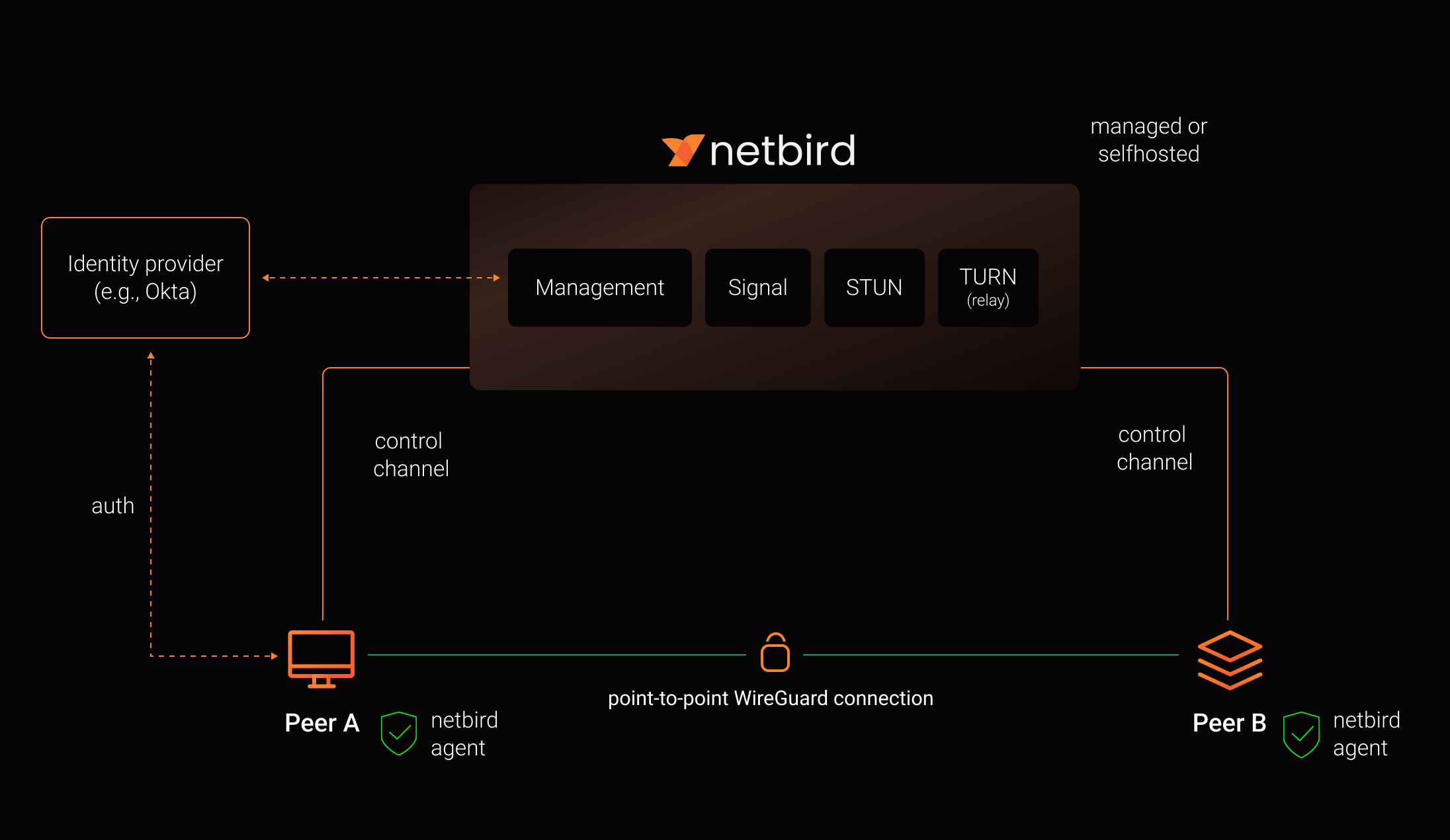
See a complete architecture overview for details.
Reporting bugs and requesting features
NetBird uses a discussion-first workflow. Bug reports and feature requests start in Discussions, not as issues.
| What you want to do | Where to go |
|---|---|
| Report a bug, regression, or unexpected behavior | Issue Triage |
| Request a feature or share an idea | Ideas & Feature Requests |
| Ask about setup, configuration, or self-hosting | Q&A / Support |
| Report a security vulnerability | Security policy, never a public thread |
Our team and maintainers triage discussions, ask follow-up questions, check for duplicates, and reproduce bugs. Validated reports are promoted to issues. This keeps the issue tracker a clear answer to one question: what is the team working on.
Please search existing discussions and issues first, including closed ones. If something similar already exists, upvote it and add your details there instead of opening a duplicate.
For bug reports, include your NetBird version, operating system, deployment type (Cloud, self-hosted, Kubernetes, or Docker), reproduction steps, expected and actual behavior, and a debug bundle where relevant:
netbird version
netbird status -d -A
netbird debug for 1m -A -S -U
-U uploads the bundle and prints a file key you can paste instead of attaching the archive.
-A anonymizes the output, which matters on a public thread. It masks most identifying details
but is not full redaction, so read the bundle before posting it. Two levels are available:
| Level | How to select | What it masks |
|---|---|---|
default |
-A / --anonymize |
Public IP addresses, IPv6 ULA addresses, MAC addresses, and domains other than netbird.io, netbird.cloud, netbird.selfhosted, and netbird.stage. IPv4 private, CGNAT, and link-local ranges are kept |
strict |
--anonymize-level strict (implies -A) |
The above, plus IPv4 private, CGNAT, and link-local ranges, peer names in front of netbird.cloud, netbird.selfhosted, and netbird.stage, and WireGuard public keys. Labels under netbird.io are kept, since it only hosts infrastructure |
See collecting a debug bundle and the CLI reference for details.
See How to use Discussions, Issues, and Pull Requests for the full workflow, or SUPPORT.md for a shorter version.
Contributing
Contributions are welcome. Read CONTRIBUTING.md first. NetBird works ticket first, anything that changes behavior needs an issue the team has agreed on before you open a pull request.
Community projects
- NetBird installer script
- netbird-tui - terminal UI for managing NetBird peers, routes, and settings
- caddy-netbird - Caddy plugin that embeds a NetBird client for proxying HTTP and TCP/UDP traffic through NetBird networks
Note: The main branch may be in an unstable or even broken state during development.
For stable versions, see releases.
Support acknowledgement
In November 2022, NetBird joined the StartUpSecure program sponsored by the Federal Ministry of Education and Research of the Federal Republic of Germany. Together with the CISPA Helmholtz Center for Information Security, NetBird brings security best practices and simplicity to private networking.

Acknowledgements
We build on open source technologies like WireGuard®, Pion ICE, and Rosenpass. We greatly appreciate the work these projects are doing, and we'd love it if you could support them too (e.g., by starring or contributing).
Legal
This repository is licensed under the BSD-3-Clause license, which applies to all parts of the repository except for the directories management/, signal/ and relay/. Those directories are licensed under the GNU Affero General Public License version 3.0 (AGPLv3). See the respective LICENSE files inside each directory.
WireGuard and the WireGuard logo are registered trademarks of Jason A. Donenfeld.