 Riccardo Manfrin
46568f7af8
Riccardo Manfrin
46568f7af8
## Describe your changes

Under lazy connections, when a routing peer goes idle its WireGuard peer
is torn down and re-created with a wake endpoint by
the activity listener, carrying only the overlay /32
(`peerCfg.AllowedIPs`). The routed subnet prefixes are dropped from
  the device on the Connected→Idle transition.

They are meant to be restored by the route watcher, which reacts to the
peer's status change and calls `recalculateRoutes` →
  `AddAllowedIP`. Two things prevent that from healing the peer:

- `AddAllowedIP` uses `update_only`, which is a silent no-op (no error)
when the peer does not exist. While the peer is
being torn down and re-armed with its wake endpoint, it is briefly
absent, so a re-add that lands in that window is lost.
- The allowed-IP refcounter only calls its add function on a prefix's
0→1 transition. The routed prefix stays referenced
across the idle cycle, so once the device entry is gone the refcounter
does not re-push it on its own, and nothing retries.

As a result, traffic to the routed subnet is black-holed while the peer
is idle. Because the wake endpoint only fires when a
packet matches the peer's AllowedIPs, a packet to the subnet is dropped
before reaching the wake endpoint, so it cannot
wake the peer. The peer only recovers when woken by other means (e.g. a
ping to its overlay IP).

  ## Approach

This change keeps the existing Connected→Idle transition as-is and
reconciles the AllowedIPs afterwards, avoiding any
additional locking on the transition path. The peer is torn down and
re-armed with its wake endpoint as today; the routed
prefixes are then re-applied from the route manager's allowed-IP
refcounter once the wake endpoint has been (re)armed.

A single add-only method, `ReconcilePeerAllowedIPs(peerKey)`, re-applies
every routed prefix currently tracked for the peer
in the refcounter (the authoritative store; it already covers static,
dynamic and dnsinterceptor routes). It runs whenever
the peer's wake endpoint is (re)created in the lazy manager — every
point where the activity listener builds it with the
  overlay /32 only:

- **initial registration** (`AddPeer`, cold start): the route manager
may have already pushed the peer's routes before the
wake endpoint existed, so those `AddAllowedIP` calls no-op'd; the
reconcile installs them on the freshly created wake
  endpoint.
- **the two paths into idle** (`DeactivatePeer` on a remote GOAWAY,
`onPeerInactivityTimedOut` on local inactivity): the
peer is torn down and re-armed, so the routed prefixes must be
re-applied.

In every case the routed prefixes end up on the wake endpoint, so
traffic to a routed subnet can wake the peer. Arming the
wake endpoint and reconciling are wrapped in a single
`armActivityListener` helper so the two always happen together.

New helper: `refcounter.Counter.KeysMatching(pred)` to enumerate a
peer's prefixes under the counter lock.

Note on scope: the reconcile restores what the refcounter tracks. All
routed AllowedIPs currently go through it, so this
covers the routed-prefix case; it does not attempt to reconcile
AllowedIPs installed outside the refcounter. The
Idle→Connected (wake) path does not need this: the peer is not removed
there (the listener close leaves it in place and only
the endpoint is updated), so a concurrent `AddAllowedIP` lands normally.

  ## Testing

Reproduced deterministically in a local dev setup (userspace client,
`NB_WG_KERNEL_DISABLED=true`, `B_LAZY_CONN_INACTIVITY_THRESHOLD=1`
inactivity threshold 1
min). A temporary 30s sleep in the tear-down → re-arm window widens the
race so the route watcher's async `AddAllowedIP`
reliably lands while the peer is absent and no-ops (the sleep is a test
aid, not part of the change):

- **without the reconcile:** after the peer goes idle, a ping to any
routed IP — both a pre-existing route and one added
  during the window — black-holes; the peer never wakes.
  - **with the reconcile:** the same ping wakes the peer and passes.

Added unit tests: `ReconcilePeerAllowedIPs` (re-applies all of a peer's
tracked prefixes, scoped to that peer) and
  `refcounter.Counter.KeysMatching`.

Note: `netbird status -d` is not a reliable signal for this —
`AddPeerStateRoute` records the route regardless of whether
the underlying `AddAllowedIP` no-op'd, so it reflects the route
manager's intent rather than device state. The reliable
  signal is functional (ping the subnet from idle).

  ## Checklist

  - [x] Is it a bug fix
  - [ ] Is a typo/documentation fix
  - [ ] Is a feature enhancement
  - [ ] It is a refactor
- [x] Created tests that fail without the change (unit tests for the
reconcile + `KeysMatching`)

  ## Documentation

- [x] Documentation is **not needed** for this change (internal client
behavior, no API / gRPC / CLI / flag change)

<!-- codesmith:footer -->
---
<a
href="https://app.blacksmith.sh/netbirdio/codesmith/netbird/pr/6863"><picture><source
media="(prefers-color-scheme: dark)"
srcset="https://pr-comments-assets.blacksmith.sh/codesmith/view-with-codesmith-dark-v2.svg"><source
media="(prefers-color-scheme: light)"
srcset="https://pr-comments-assets.blacksmith.sh/codesmith/view-with-codesmith-light-v2.svg"><img
alt="View with Codesmith"
src="https://pr-comments-assets.blacksmith.sh/codesmith/view-with-codesmith-dark-v2.svg"></picture></a>
<a
href="https://backend.blacksmith.sh/track/enable-autofix?expires=1787330960&installation_model_id=427504&pr_number=6863&repository=netbirdio%2Fnetbird&return_to=https%3A%2F%2Fgithub.com%2Fnetbirdio%2Fnetbird%2Fpull%2F6863&signature=f3d6a97d7db82e92b3939fdd0f159c5ee74913ff88f4eb82e41e88fcb787aff4"><picture><source
media="(prefers-color-scheme: dark)"
srcset="https://pr-comments-assets.blacksmith.sh/codesmith/autofix-with-codesmith-dark.svg"><source
media="(prefers-color-scheme: light)"
srcset="https://pr-comments-assets.blacksmith.sh/codesmith/autofix-with-codesmith-light.svg"><img
alt="Autofix with Codesmith"
src="https://pr-comments-assets.blacksmith.sh/codesmith/autofix-with-codesmith-dark.svg"></picture></a>
<sup>Need help on this PR? Tag <code>/codesmith</code> with what you
need. Autofix is disabled.</sup>

<!-- codesmith:autofix:disabled -->
<!-- /codesmith:footer -->

<!-- This is an auto-generated comment: release notes by coderabbit.ai
-->
## Summary by CodeRabbit

* **Bug Fixes**
* Routed IP assignments are automatically reconciled and restored
whenever a peer’s lazy wake endpoint is armed or re-armed.
* Routed allowed IPs are re-applied after inactivity transitions and
monitoring re-initialization.
* If reconciliation can’t be performed, the client safely skips it; if
reconciliation encounters issues, failures are logged without stopping
connection monitoring.
<!-- end of auto-generated comment: release notes by coderabbit.ai -->









Start using NetBird at netbird.io
See Documentation
Join our Slack channel or our Community forum
🚀 We are hiring! Join us at https://netbird.io/careers
🤖 NetBird Agent Network (Beta)
Identity-aware access control for AI agents — keyless access to LLM APIs and private resources over the encrypted NetBird tunnel. See
agent-network/or read the docs at netbird.ai.
NetBird combines a configuration-free peer-to-peer private network and a centralized access control system in a single platform, making it easy to create secure private networks for your organization or home.
Connect. NetBird creates a WireGuard-based overlay network that automatically connects your machines over an encrypted tunnel, leaving behind the hassle of opening ports, complex firewall rules, VPN gateways, and so forth.
Secure. NetBird enables secure remote access by applying granular access policies while allowing you to manage them intuitively from a single place. Works universally on any infrastructure.
https://github.com/user-attachments/assets/10cec749-bb56-4ab3-97af-4e38850108d2
Self-host NetBird (video)

Key features
Quickstart with NetBird Cloud
- Download and install NetBird at https://app.netbird.io/install.
- Follow the steps to sign up with Google, Microsoft, GitHub or your email address.
- Check the NetBird admin UI.
Quickstart with self-hosted NetBird
This is the quickest way to try self-hosted NetBird. It should take around 5 minutes to get started if you already have a public domain and a VM. Follow the Advanced guide with a custom identity provider for installations with different IdPs.
Infrastructure requirements:
- A Linux VM with at least 1 CPU and 2 GB of memory.
- The VM should be publicly accessible on TCP ports 80 and 443 and UDP port 3478.
- A public domain name pointing to the VM.
Software requirements:
- Docker with the Compose plugin (Compose v2 or higher). See the Docker installation guide.
Steps
- Download and run the installation script:
export NETBIRD_DOMAIN=netbird.example.com; curl -fsSL https://github.com/netbirdio/netbird/releases/latest/download/getting-started.sh | bash
A bit on NetBird internals
- Every machine in the network runs the NetBird agent, which manages WireGuard.
- Every agent connects to the Management Service, which holds network state, manages peer IPs, and distributes updates to agents.
- Agents use ICE (via pion/ice) to discover connection candidates for peer-to-peer connections.
- Candidates are discovered with the help of STUN servers.
- Agents negotiate a connection through the Signal Service, exchanging end-to-end encrypted messages with candidates.
- When NAT traversal fails (e.g. mobile carrier-grade NAT) and a direct p2p connection isn't possible, the system falls back to a Relay Service and a secure WireGuard tunnel is established through it.
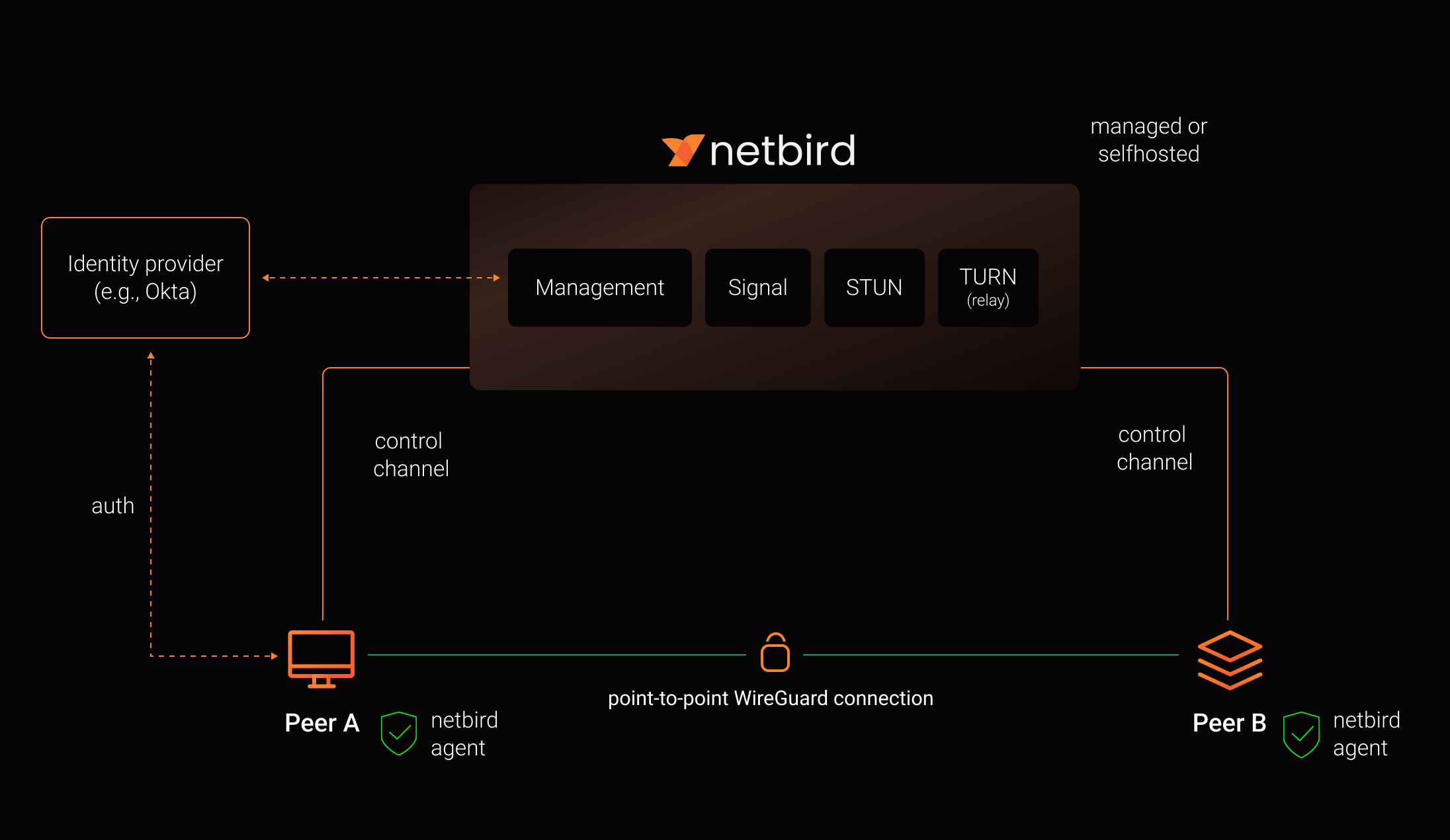
See a complete architecture overview for details.
Community projects
- NetBird installer script
- netbird-tui - terminal UI for managing NetBird peers, routes, and settings
- caddy-netbird - Caddy plugin that embeds a NetBird client for proxying HTTP and TCP/UDP traffic through NetBird networks
Note: The main branch may be in an unstable or even broken state during development.
For stable versions, see releases.
Support acknowledgement
In November 2022, NetBird joined the StartUpSecure program sponsored by the Federal Ministry of Education and Research of the Federal Republic of Germany. Together with the CISPA Helmholtz Center for Information Security, NetBird brings security best practices and simplicity to private networking.

Acknowledgements
We build on open-source technologies like WireGuard®, Pion ICE, and Rosenpass. We greatly appreciate the work these projects are doing, and we'd love it if you could support them too (e.g., by starring or contributing).
Legal
This repository is licensed under the BSD-3-Clause license, which applies to all parts of the repository except for the directories management/, signal/ and relay/. Those directories are licensed under the GNU Affero General Public License version 3.0 (AGPLv3). See the respective LICENSE files inside each directory.
WireGuard and the WireGuard logo are registered trademarks of Jason A. Donenfeld.