 shuuri-labs
b352ab84c0
shuuri-labs
b352ab84c0
* add external reverse proxy config steps to quickstart script

* remove generated files

* - Remove 'press enter' prompt from post-traefik config since traefik requires no manual config
- Improve npm flow (ask users for docker network, user container names in config)

* fixes for npm flow

* nginx flow fixes

* caddy flow fixes

* Consolidate NPM_NETWORK, NGINX_NETWORK, CADDY_NETWORK into single
EXTERNAL_PROXY_NETWORK variable. Add read_proxy_docker_network()
function that prompts for Docker network for options 2-4 (Nginx,
NPM, Caddy). Generated configs now use container names when a
Docker network is specified.

* fix https for traefik

* fix sonar code smells

* fix sonar smell (add return to render_dashboard_env)

* added tls instructions to nginx flow

* removed unused bind_addr variable from quickstart.sh

* Refactor getting-started.sh for improved maintainability

Break down large functions into focused, single-responsibility components:
- Split init_environment() into 6 initialization functions
- Split print_post_setup_instructions() into 6 proxy-specific functions
- Add section headers for better code organization
- Fix 3 code smell issues (unused bind_addr variables)
- Add TLS certificate documentation for Nginx
- Link reverse proxy names to docs sections

Reduces largest function from 205 to ~90 lines while maintaining
single-file distribution. No functional changes.

* - Remove duplicate network display logic in Traefik instructions
- Use upstream_host instead of bind_addr for NPM forward hostname
- Use upstream_host instead of bind_addr in manual proxy route examples
- Prevents displaying invalid 0.0.0.0 as connection target in setup instructions

* add wait_management_direct to caddy flow to ensure script waits until containers are running/passing healthchecks before reporting 'done!'




Start using NetBird at netbird.io
See Documentation
Join our Slack channel or our Community forum
🚀 We are hiring! Join us at careers.netbird.io
New: NetBird terraform provider
NetBird combines a configuration-free peer-to-peer private network and a centralized access control system in a single platform, making it easy to create secure private networks for your organization or home.
Connect. NetBird creates a WireGuard-based overlay network that automatically connects your machines over an encrypted tunnel, leaving behind the hassle of opening ports, complex firewall rules, VPN gateways, and so forth.
Secure. NetBird enables secure remote access by applying granular access policies while allowing you to manage them intuitively from a single place. Works universally on any infrastructure.
Open Source Network Security in a Single Platform
https://github.com/user-attachments/assets/10cec749-bb56-4ab3-97af-4e38850108d2
NetBird on Lawrence Systems (Video)
Key features
| Connectivity | Management | Security | Automation | Platforms |
|---|---|---|---|---|
|
|
|
|
|
|
|
|
||
|
|
|
|
|
|
|
|
|
|
|
|
|
|
|
|
||||
|
||||
|
Quickstart with NetBird Cloud
- Download and install NetBird at https://app.netbird.io/install
- Follow the steps to sign-up with Google, Microsoft, GitHub or your email address.
- Check NetBird admin UI.
- Add more machines.
Quickstart with self-hosted NetBird
This is the quickest way to try self-hosted NetBird. It should take around 5 minutes to get started if you already have a public domain and a VM. Follow the Advanced guide with a custom identity provider for installations with different IDPs.
Infrastructure requirements:
- A Linux VM with at least 1CPU and 2GB of memory.
- The VM should be publicly accessible on TCP ports 80 and 443 and UDP port: 3478.
- Public domain name pointing to the VM.
Software requirements:
- Docker installed on the VM with the docker-compose plugin (Docker installation guide) or docker with docker-compose in version 2 or higher.
- jq installed. In most distributions
Usually available in the official repositories and can be installed with
sudo apt install jqorsudo yum install jq - curl installed.
Usually available in the official repositories and can be installed with
sudo apt install curlorsudo yum install curl
Steps
- Download and run the installation script:
export NETBIRD_DOMAIN=netbird.example.com; curl -fsSL https://github.com/netbirdio/netbird/releases/latest/download/getting-started.sh | bash
- Once finished, you can manage the resources via
docker-compose
A bit on NetBird internals
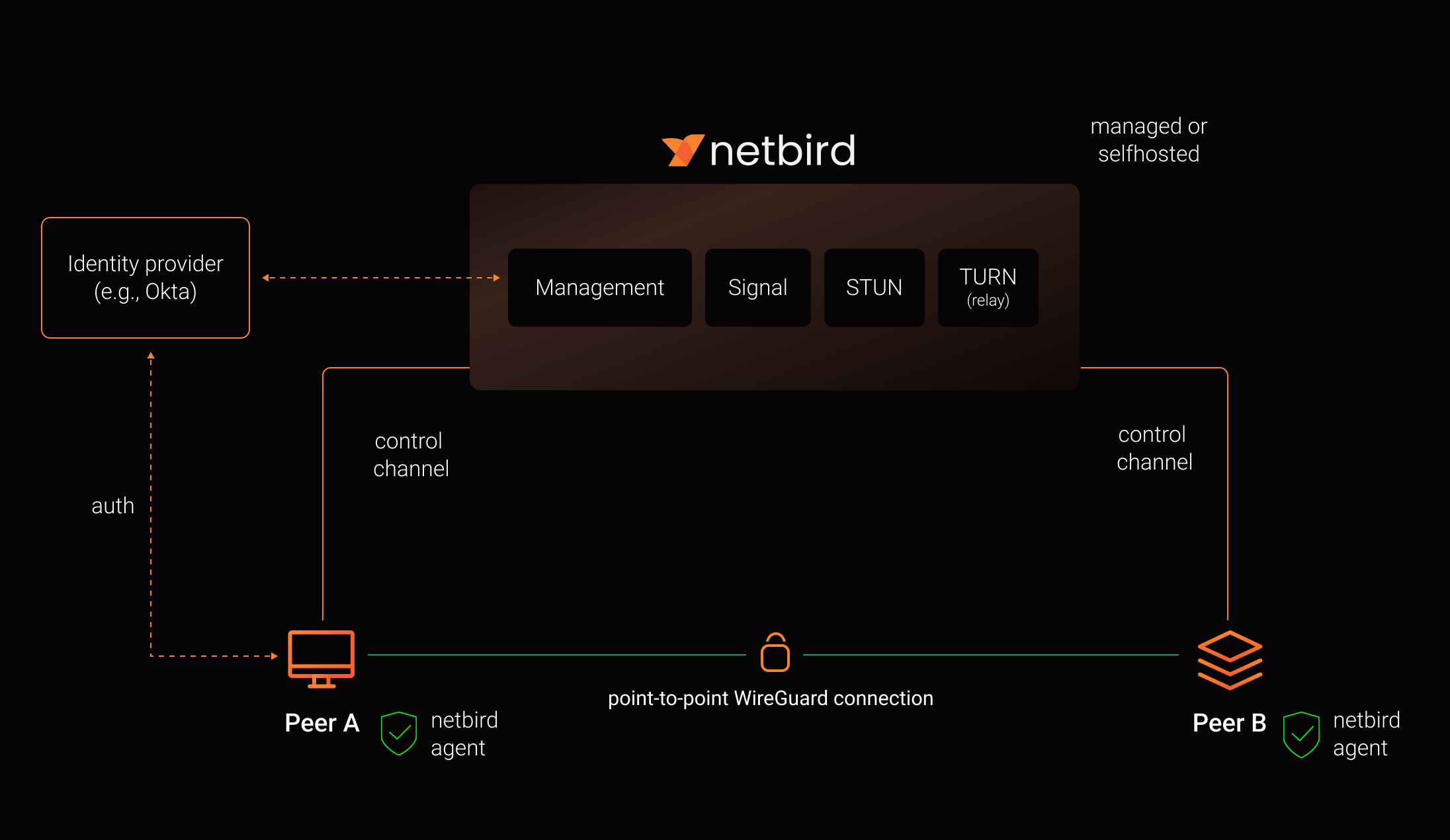
- Every machine in the network runs NetBird Agent (or Client) that manages WireGuard.
- Every agent connects to Management Service that holds network state, manages peer IPs, and distributes network updates to agents (peers).
- NetBird agent uses WebRTC ICE implemented in pion/ice library to discover connection candidates when establishing a peer-to-peer connection between machines.
- Connection candidates are discovered with the help of STUN servers.
- Agents negotiate a connection through Signal Service passing p2p encrypted messages with candidates.
- Sometimes the NAT traversal is unsuccessful due to strict NATs (e.g. mobile carrier-grade NAT) and a p2p connection isn't possible. When this occurs the system falls back to a relay server called TURN, and a secure WireGuard tunnel is established via the TURN server.
Coturn is the one that has been successfully used for STUN and TURN in NetBird setups.
See a complete architecture overview for details.
Community projects
Note: The main branch may be in an unstable or even broken state during development.
For stable versions, see releases.
Support acknowledgement
In November 2022, NetBird joined the StartUpSecure program sponsored by The Federal Ministry of Education and Research of The Federal Republic of Germany. Together with CISPA Helmholtz Center for Information Security NetBird brings the security best practices and simplicity to private networking.

Testimonials
We use open-source technologies like WireGuard®, Pion ICE (WebRTC), Coturn, and Rosenpass. We very much appreciate the work these guys are doing and we'd greatly appreciate if you could support them in any way (e.g., by giving a star or a contribution).
Legal
This repository is licensed under BSD-3-Clause license that applies to all parts of the repository except for the directories management/, signal/ and relay/. Those directories are licensed under the GNU Affero General Public License version 3.0 (AGPLv3). See the respective LICENSE files inside each directory.
WireGuard and the WireGuard logo are registered trademarks of Jason A. Donenfeld.