 mlsmaycon
5eb28acb11
mlsmaycon
5eb28acb11
Replace the per-peer linked list with a per-account map keyed by
accountID. Each entry holds only the latest disconnect timestamp we
have observed for that account and a single timer that fires the next
sweep. Sweeps query the database for the authoritative stale set,
batch the deletes through peers.Manager.DeletePeers, then drop the
account from the tracker when lastDisc + lifeTime <= now (else
re-arm at horizon + cleanupWindow).

The drop rule is the entire termination story: an account stays
tracked only while OnPeerDisconnected keeps refreshing the
timestamp. There is no internal feedback loop that can advance
lastDisc on its own, so once disconnects stop the account drops in
at most one sweep.

A timestamp beats the ref-counter alternative because the counter
drifts positive in three real situations the cleanup loop has no
signal for: peers deleted via the API while offline, peers that
reconnect within the lifetime window, and management restarts. The
timestamp design never claims to know the size of the stale set —
it only knows the latest disconnect we observed and uses that to
bound when it is safe to drop the account.

OnPeerConnected becomes a no-op. The sweep query already filters
reconnected peers at the database level (peer_status_connected =
false in the WHERE clause), so there is nothing the in-memory
tracker needs to do on reconnect. The interface method is preserved
for call-site compatibility.

LoadInitialPeers no longer runs the catch-up query synchronously.
It schedules a deferred load via time.AfterFunc at a random delay
between 8 and 10 minutes. Without the jitter, every management
replica in a fleet-wide deploy would issue the catch-up query
simultaneously. The catch-up itself is one GROUP BY against the
peers table:
```sql
  SELECT account_id, MAX(peer_status_last_seen)
  FROM peers
  WHERE ephemeral = true AND peer_status_connected = false
  GROUP BY account_id
```
For each row the tracker seeds an entry and arms a sweep at
max(now, last_seen + lifeTime) + cleanupWindow — so accounts whose
backlog is already stale get cleaned soon after the delay elapses,
and accounts that disconnected recently wait the remaining window.
OnPeerDisconnected calls that arrive during the delay window seed
the tracker live, and the catch-up query skips accounts that are
already tracked.

Stop() cancels both the deferred initial-load timer and every
per-account sweep timer, and flips a stopped flag so subsequent
OnPeerDisconnected calls are ignored. This makes restarts and test
teardown clean.

Two new store methods:
  GetStaleEphemeralPeerIDsForAccount(ctx, accountID, olderThan)
  GetEphemeralAccountsLastDisconnect(ctx)
Both are scoped, indexable queries that the existing peers table
supports without schema changes.

The pending metric is renamed from
management.ephemeral.peers.pending to
management.ephemeral.accounts.tracked to reflect the new semantics
(it now counts accounts on the cleanup list, not peers). Method
names on the metrics type are unchanged so no production call site
has to move. No new metric labels, no per-account cardinality.

The algorithm was validated against an in-memory SQLite peers
table through an 11-scenario prototype kept under proto/, including
pathological-churn and 4-hour randomized simulations. All scenarios
terminate; max observed per-account sweep rate stays bounded near
the lifeTime + cleanupWindow cadence even under sustained
disconnect churn.

Verification: go build, go vet, race-clean tests across the
ephemeral, store, and telemetry packages, plus a clean
golangci-lint pass on the touched packages.




Start using NetBird at netbird.io
See Documentation
Join our Slack channel or our Community forum
🚀 We are hiring! Join us at careers.netbird.io
New: NetBird terraform provider
NetBird combines a configuration-free peer-to-peer private network and a centralized access control system in a single platform, making it easy to create secure private networks for your organization or home.
Connect. NetBird creates a WireGuard-based overlay network that automatically connects your machines over an encrypted tunnel, leaving behind the hassle of opening ports, complex firewall rules, VPN gateways, and so forth.
Secure. NetBird enables secure remote access by applying granular access policies while allowing you to manage them intuitively from a single place. Works universally on any infrastructure.
Open Source Network Security in a Single Platform
https://github.com/user-attachments/assets/10cec749-bb56-4ab3-97af-4e38850108d2
Self-Host NetBird (Video)

Key features
| Connectivity | Management | Security | Automation | Platforms |
|---|---|---|---|---|
|
|
|
|
|
|
|
|
||
|
|
|
|
|
|
|
|
|
|
|
|
|
|
|
|
||||
|
||||
|
Quickstart with NetBird Cloud
- Download and install NetBird at https://app.netbird.io/install
- Follow the steps to sign-up with Google, Microsoft, GitHub or your email address.
- Check NetBird admin UI.
- Add more machines.
Quickstart with self-hosted NetBird
This is the quickest way to try self-hosted NetBird. It should take around 5 minutes to get started if you already have a public domain and a VM. Follow the Advanced guide with a custom identity provider for installations with different IDPs.
Infrastructure requirements:
- A Linux VM with at least 1CPU and 2GB of memory.
- The VM should be publicly accessible on TCP ports 80 and 443 and UDP port: 3478.
- Public domain name pointing to the VM.
Software requirements:
- Docker installed on the VM with the docker-compose plugin (Docker installation guide) or docker with docker-compose in version 2 or higher.
- jq installed. In most distributions
Usually available in the official repositories and can be installed with
sudo apt install jqorsudo yum install jq - curl installed.
Usually available in the official repositories and can be installed with
sudo apt install curlorsudo yum install curl
Steps
- Download and run the installation script:
export NETBIRD_DOMAIN=netbird.example.com; curl -fsSL https://github.com/netbirdio/netbird/releases/latest/download/getting-started.sh | bash
- Once finished, you can manage the resources via
docker-compose
A bit on NetBird internals
- Every machine in the network runs NetBird Agent (or Client) that manages WireGuard.
- Every agent connects to Management Service that holds network state, manages peer IPs, and distributes network updates to agents (peers).
- NetBird agent uses WebRTC ICE implemented in pion/ice library to discover connection candidates when establishing a peer-to-peer connection between machines.
- Connection candidates are discovered with the help of STUN servers.
- Agents negotiate a connection through Signal Service passing p2p encrypted messages with candidates.
- Sometimes the NAT traversal is unsuccessful due to strict NATs (e.g. mobile carrier-grade NAT) and a p2p connection isn't possible. When this occurs the system falls back to a relay server called TURN, and a secure WireGuard tunnel is established via the TURN server.
Coturn is the one that has been successfully used for STUN and TURN in NetBird setups.
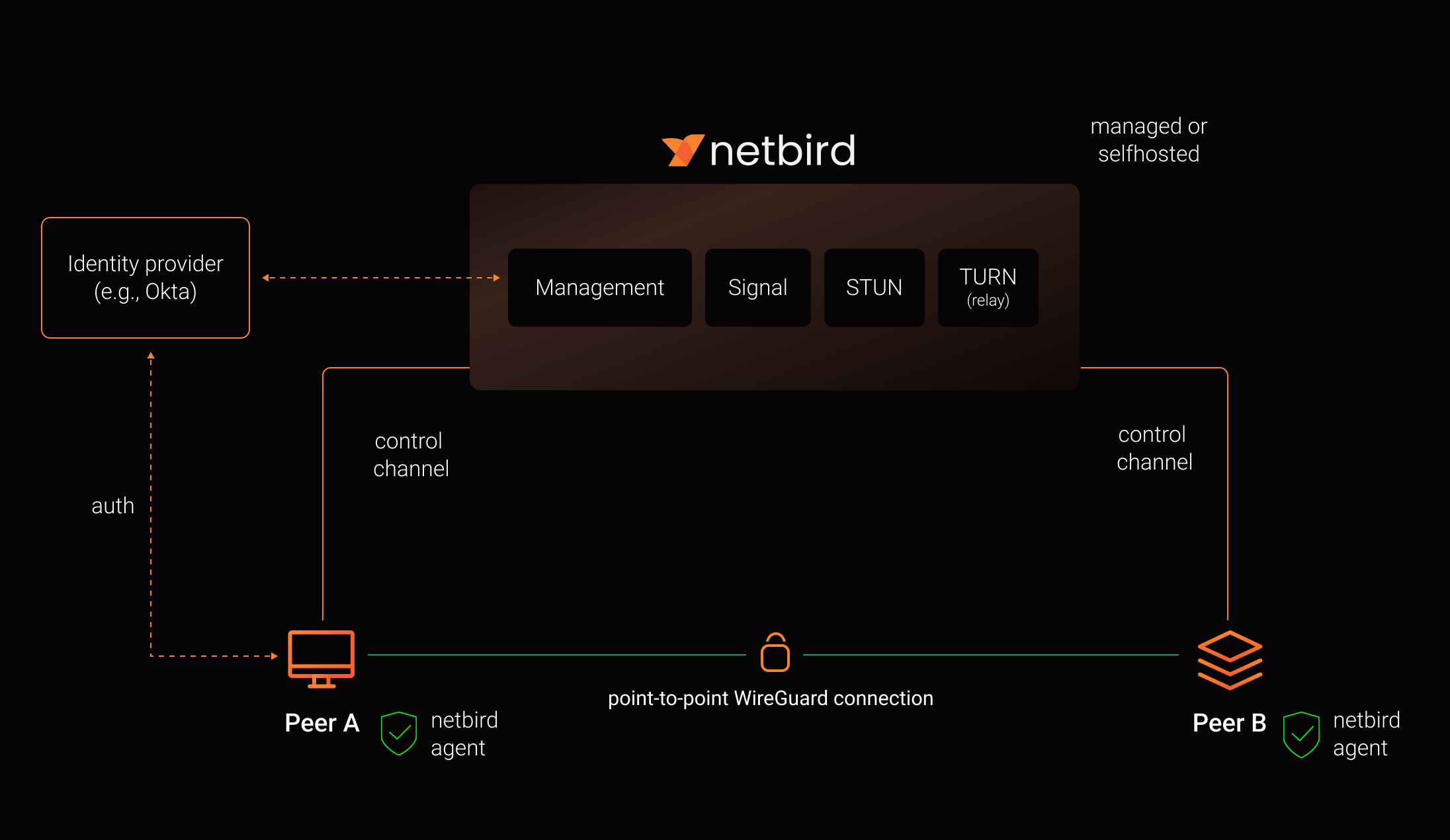
See a complete architecture overview for details.
Community projects
- NetBird installer script
- NetBird ansible collection by Dominion Solutions
- netbird-tui — terminal UI for managing NetBird peers, routes, and settings
Note: The main branch may be in an unstable or even broken state during development.
For stable versions, see releases.
Support acknowledgement
In November 2022, NetBird joined the StartUpSecure program sponsored by The Federal Ministry of Education and Research of The Federal Republic of Germany. Together with CISPA Helmholtz Center for Information Security NetBird brings the security best practices and simplicity to private networking.

Testimonials
We use open-source technologies like WireGuard®, Pion ICE (WebRTC), Coturn, and Rosenpass. We very much appreciate the work these guys are doing and we'd greatly appreciate if you could support them in any way (e.g., by giving a star or a contribution).
Legal
This repository is licensed under BSD-3-Clause license that applies to all parts of the repository except for the directories management/, signal/ and relay/. Those directories are licensed under the GNU Affero General Public License version 3.0 (AGPLv3). See the respective LICENSE files inside each directory.
WireGuard and the WireGuard logo are registered trademarks of Jason A. Donenfeld.